Docspro
A platform for legal process automation and document preparation.
Docspro started as an internal startup inside a law firm: three engineers had spent three months building without a product direction. When I joined as the only designer, the team had no hypothesis-testing process and no clear sense of where to go. The domain was new to me as well — I had to learn the legal field at the pace of real tasks. Over time, full responsibility for the product landed on me: I went from "player-coach" to PM, growing the team to 11 people.
LegalTech · Startup · B2B SaaS · 2018–2020 · Product Designer/Product Manager
Context
The market's core pain was obvious: lawyers spent hours manually entering the same data into standard documents. Any typo or mismatch between a contract and its annex could have serious consequences. On average, approving a document package took 7 days — the document circled around, came back for edits, and went out for review again.
The second problem was structural: a single document could contain the deal amount, personal data, and standard terms side by side, while different roles — from intern to executive — needed different levels of access to that data. Existing solutions (RocketLawyer, HotDocs, WonderLegal) didn't cover this need: they either gave access to everything or didn't allow building logic around a specific company's processes.
There was an internal challenge too. The developers had built the front end on Atlassian's off-the-shelf design system. I was against it from day one: the logic of Jira and Confluence doesn't match the logic of a document editor. Back then I didn't carry enough weight on the team to reverse the decision — eventually everything was rewritten from scratch, exactly as I had warned.
Process
40
interviews
20
sability tests
First, I had to understand the domain. I ran a series of in-depth interviews with lawyers inside the founding company and with external users — 30+ interviews in total, some under the mentorship of Ivan Zamesin — and 20+ usability tests, turning insights into design decisions. In parallel, I studied competitors, looking for the gap the market had left open.
I moved iteratively.
First, a table view — fast and low-risk, to show progress and ease the pressure around a team that had been stuck for three months. Then I moved on to the editor and the template builder. Every decision went through usability testing — 20+ tests with real users: lawyers who prepare and approve documents every day.
Document space
The product's entry point. Folders by category, tags, statuses with color indication. Next to each document, counters show its links to other documents. Users immediately understand what's happening across the entire set and quickly find what they need.
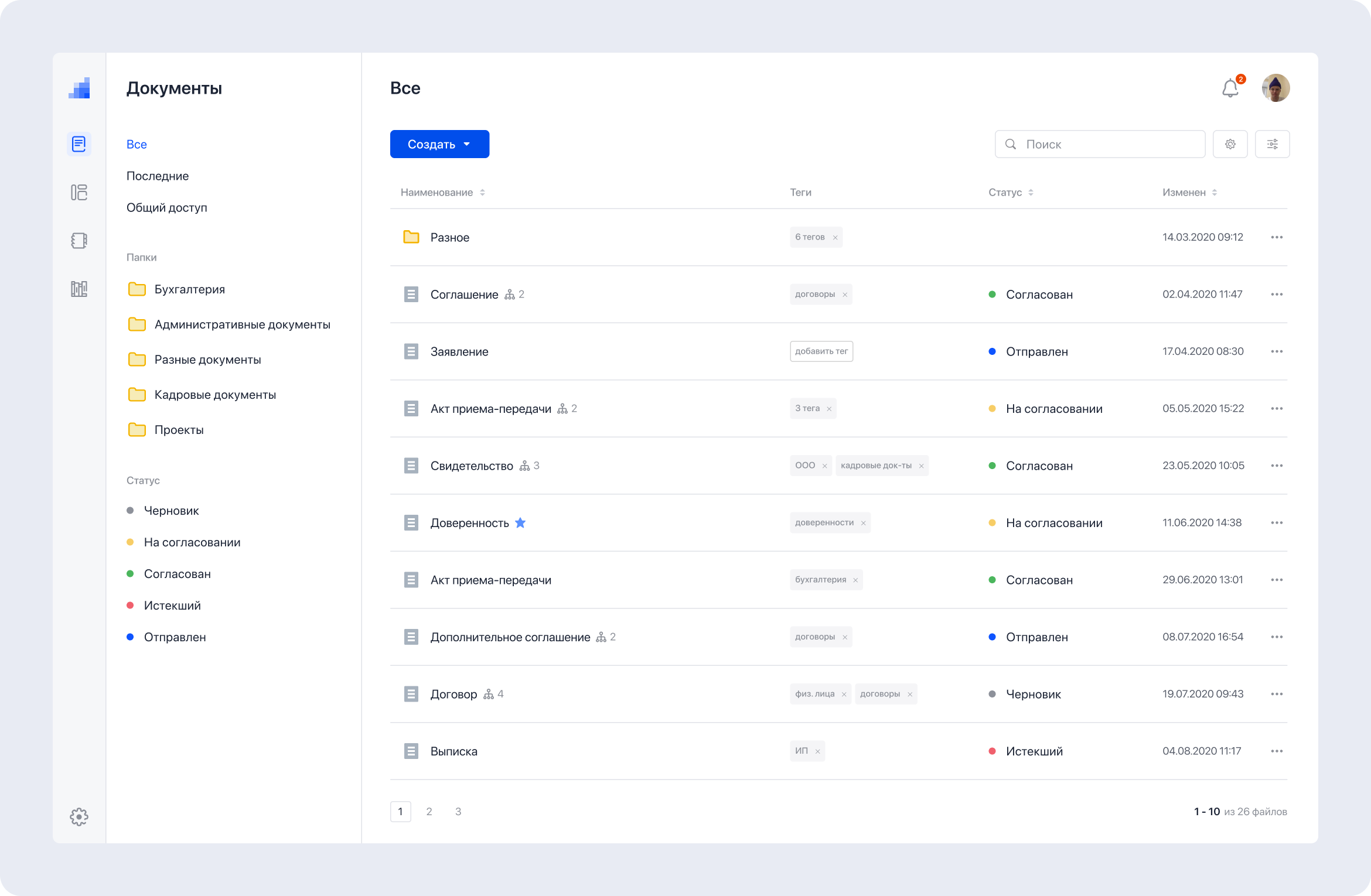
A single space: folders, tags, statuses, and links between documents. Status filtering on the left shows, in one click, every document stuck in approval, for example.
Template builder
The core of the product and my key invention. I came up with the concept of linked templates with data transfer between documents, validated its feasibility with the engineering team, and took it to production. At the time, no such technology existed on either the Russian or the Western market.
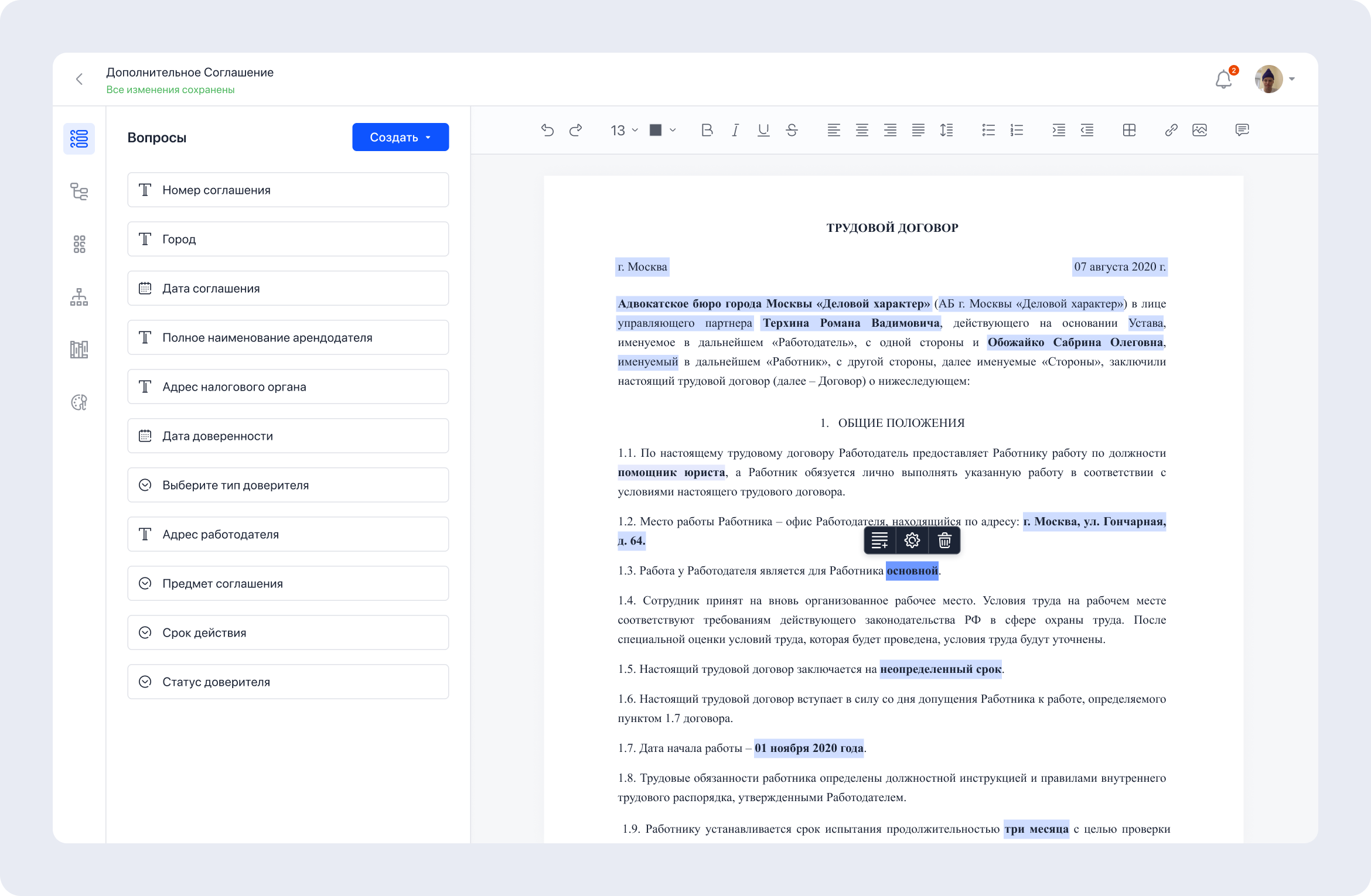
The template editor treats the document as a living structure: questions — fields the user will fill in when creating a document — are attached to text fragments. On the left, the full list of the template's questions.
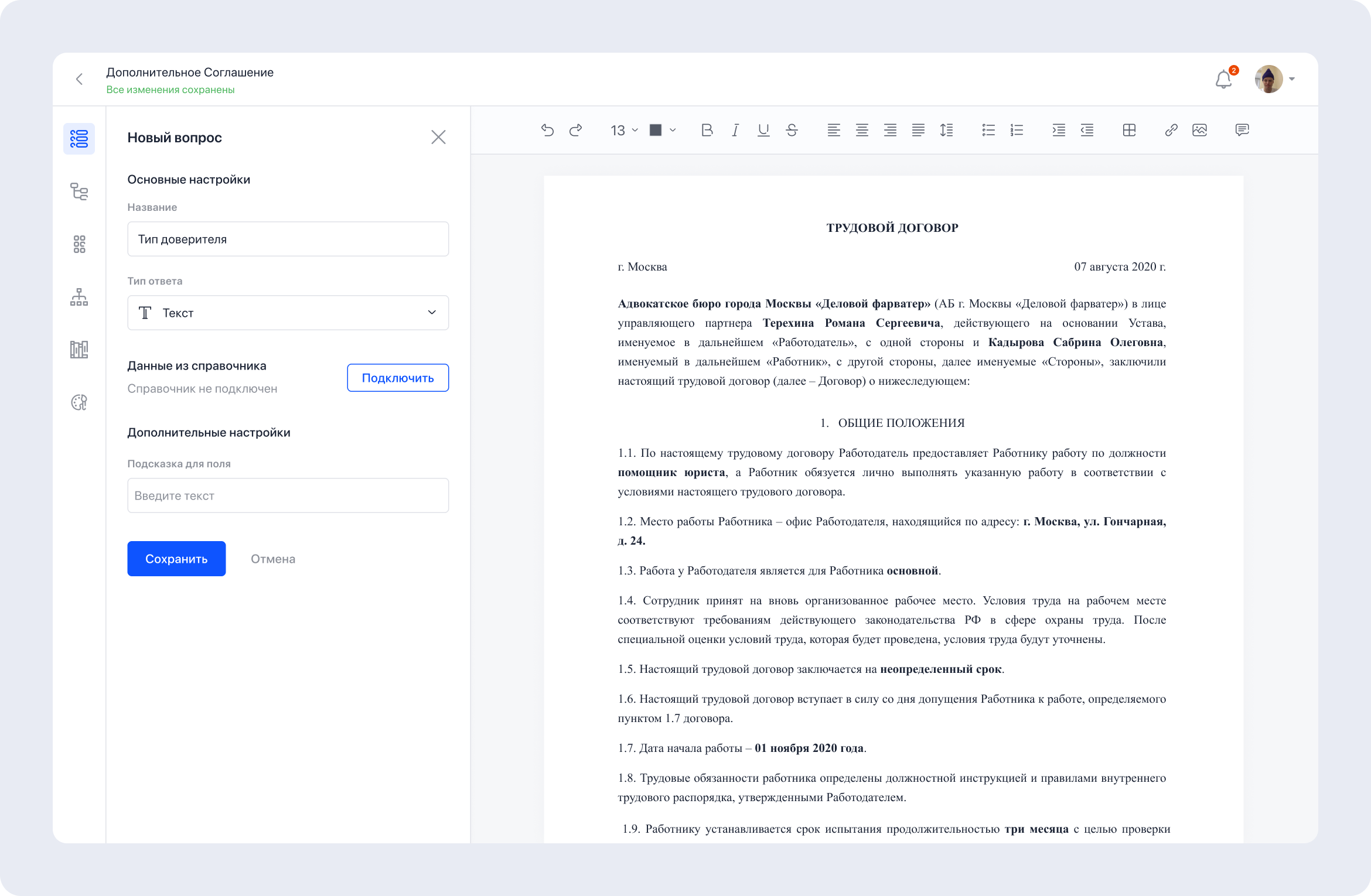
Creating a question: a name, an answer type — text, date, number, dropdown — and a directory connected as a data source. Everything is configured by the template editor, no engineers involved.
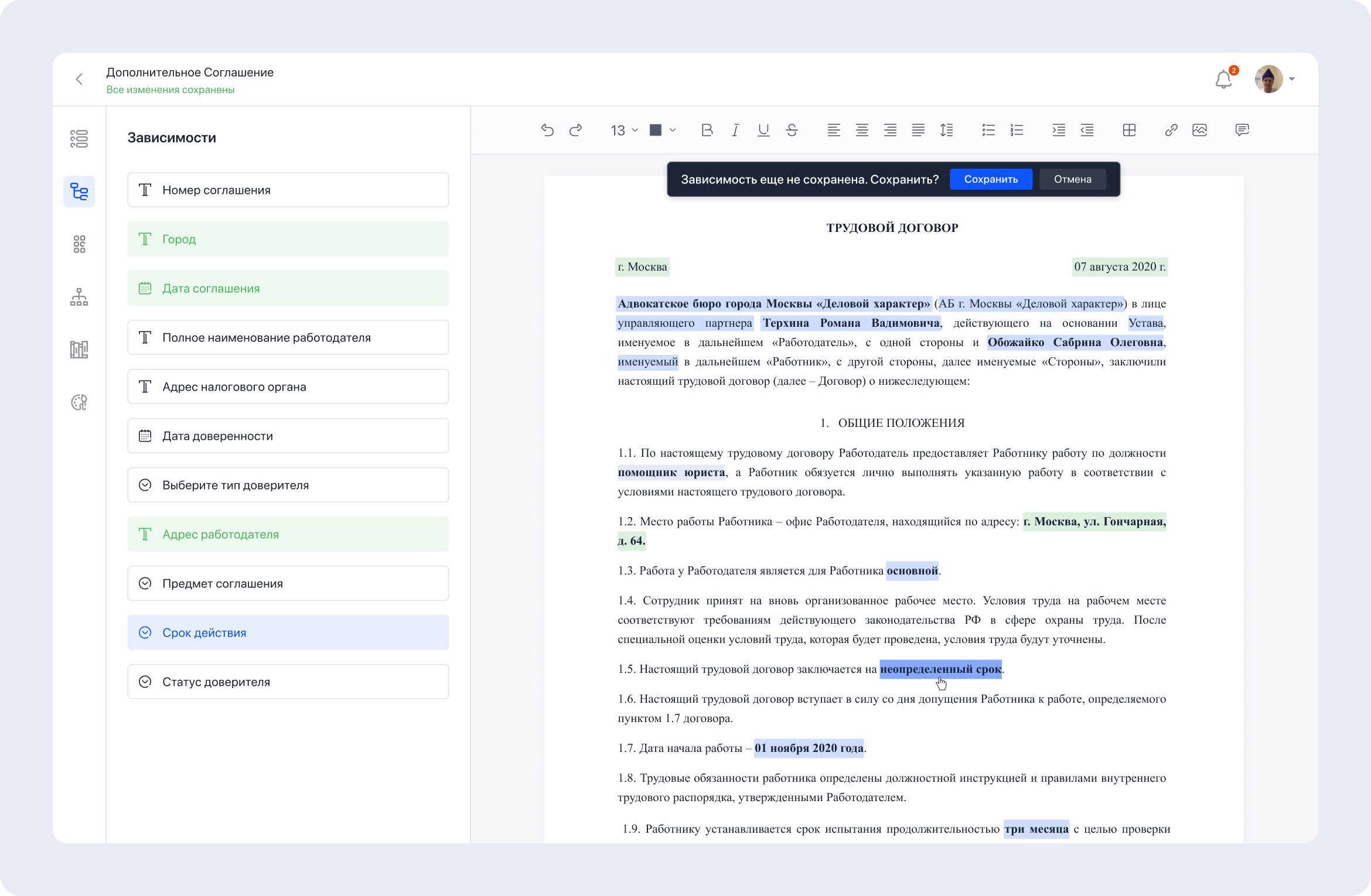
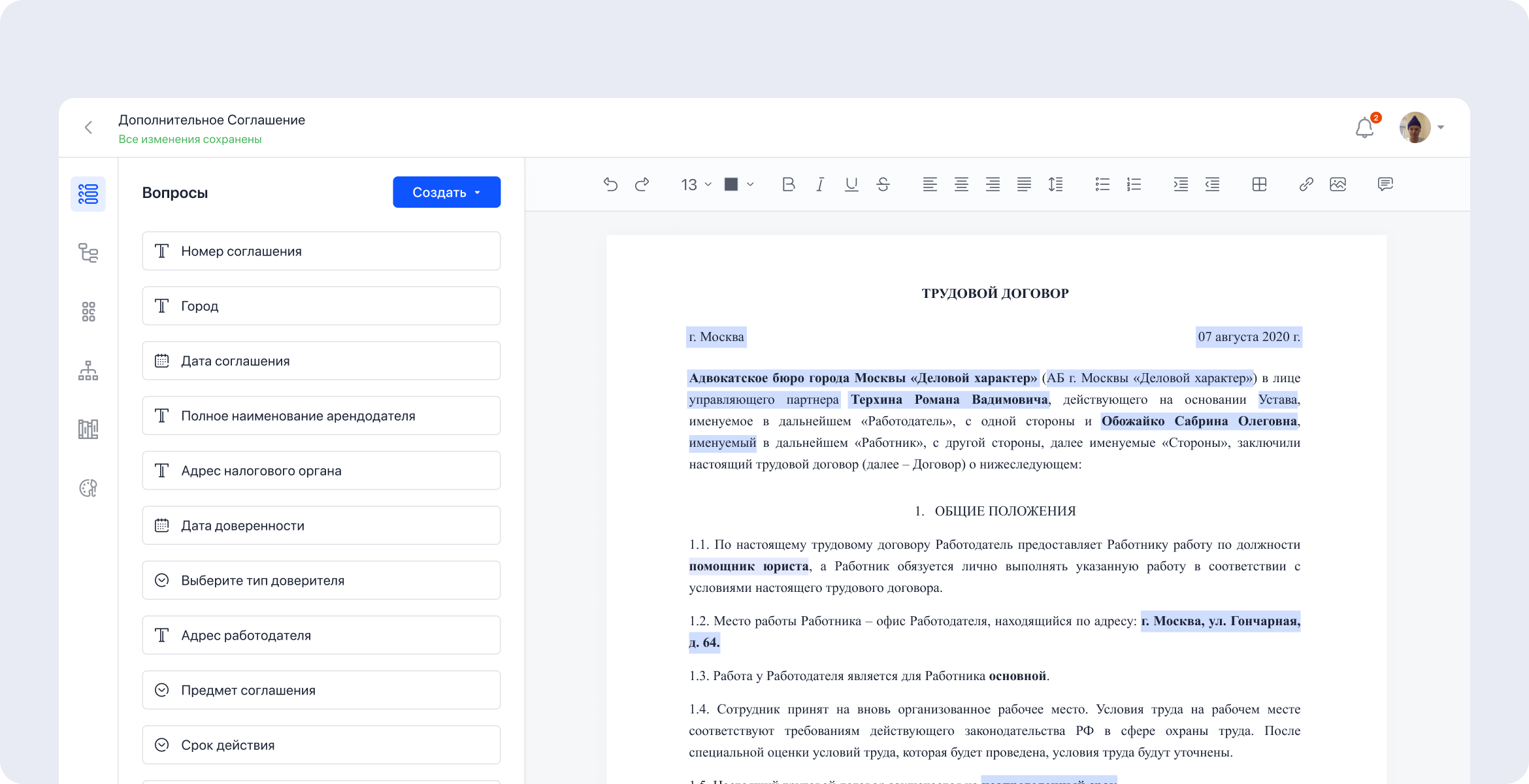
Dependency setup mode: green highlights questions already attached to the text; blue marks the selected fragment whose dependency is being configured right now.
Data transfer between documents
The builder's key mechanic. In a typical document package, the same fields repeat over and over: counterparty name, banking details, amount, address. Instead of filling in every field by hand, the user enters the data once — and it propagates across the entire package.
Depending on the value selected in a single field, entire blocks of text change automatically across the documents: choose "Individual" as the principal type — and the wording across the whole package restructures to match.
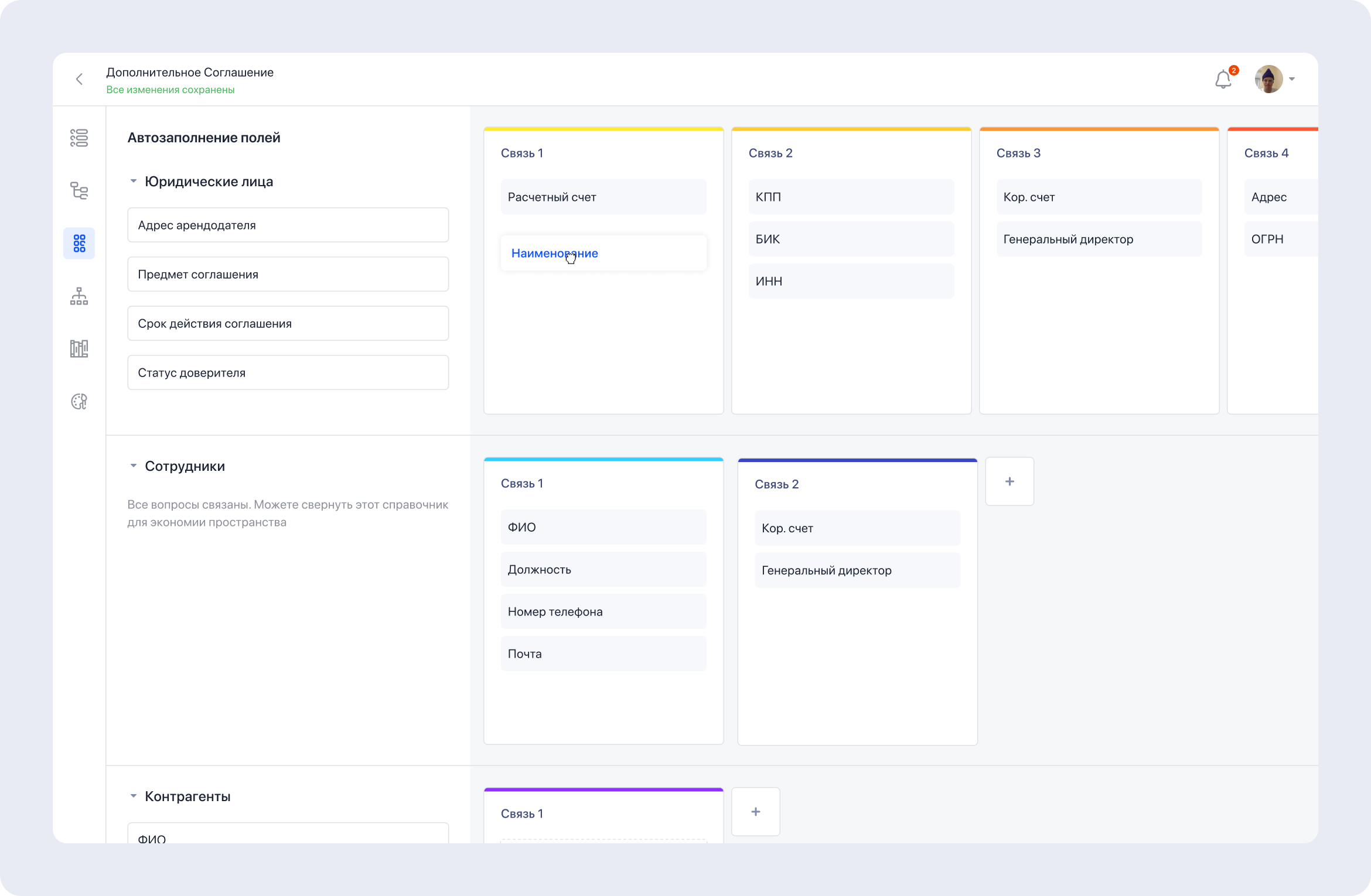
Autofill setup: fields are grouped into color-coded links within entities. A value entered in one document is automatically inserted into every field of its link across the package.
The result for the end user
All of the builder's complexity is hidden: a questionnaire with a handful of fields on the left, a finished document assembling itself in real time on the right. Fill it in, download it, or send it for signature — the manual-entry routine is gone.
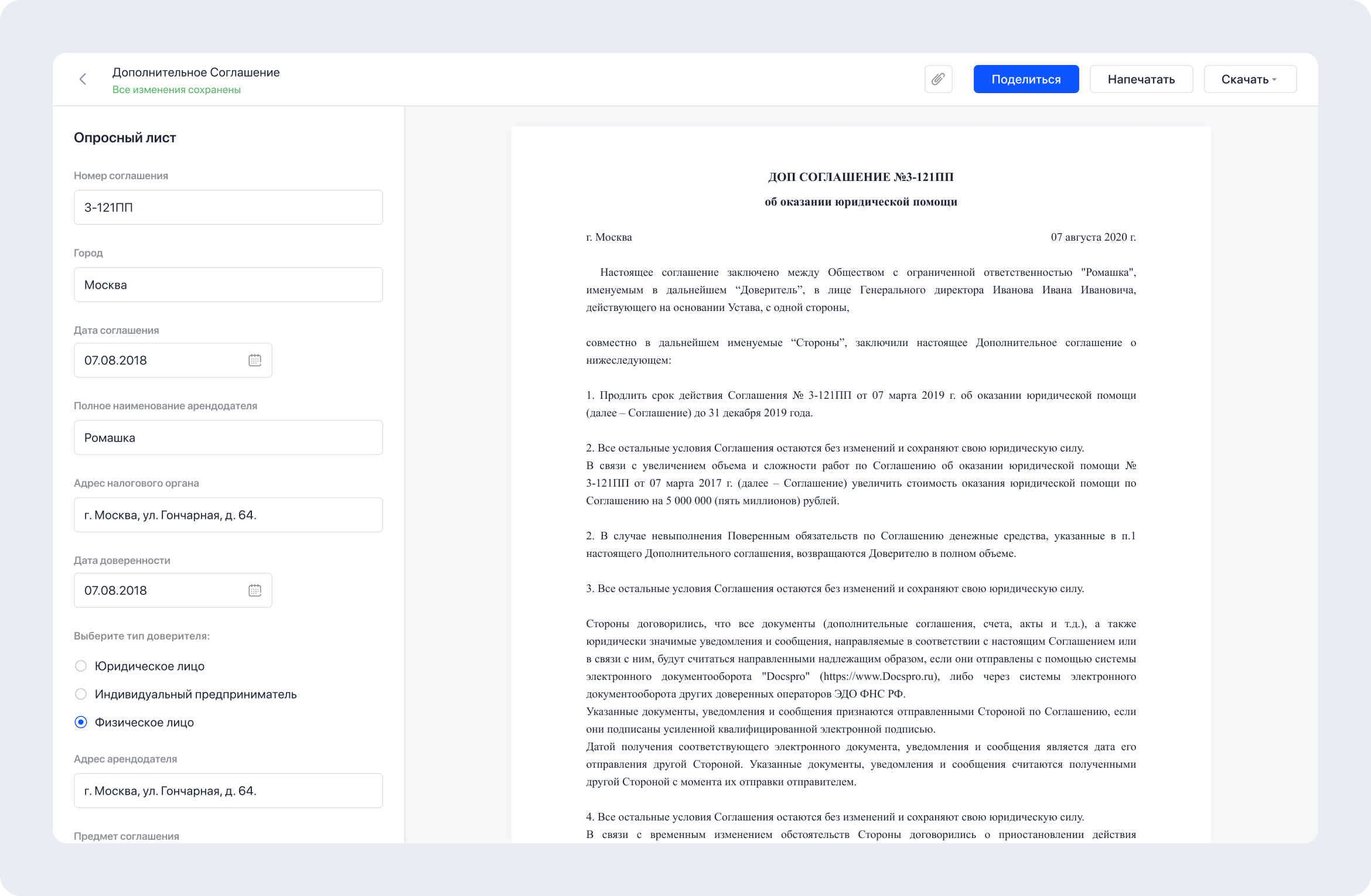
The questionnaire and the finished document.
Directories
On top of the builder, I designed directories — databases of employees, clients, and counterparties. Information entered once is automatically pulled into documents as they're created. Data about a person or a company lives in one place and lands wherever it's needed — double entry disappeared entirely.
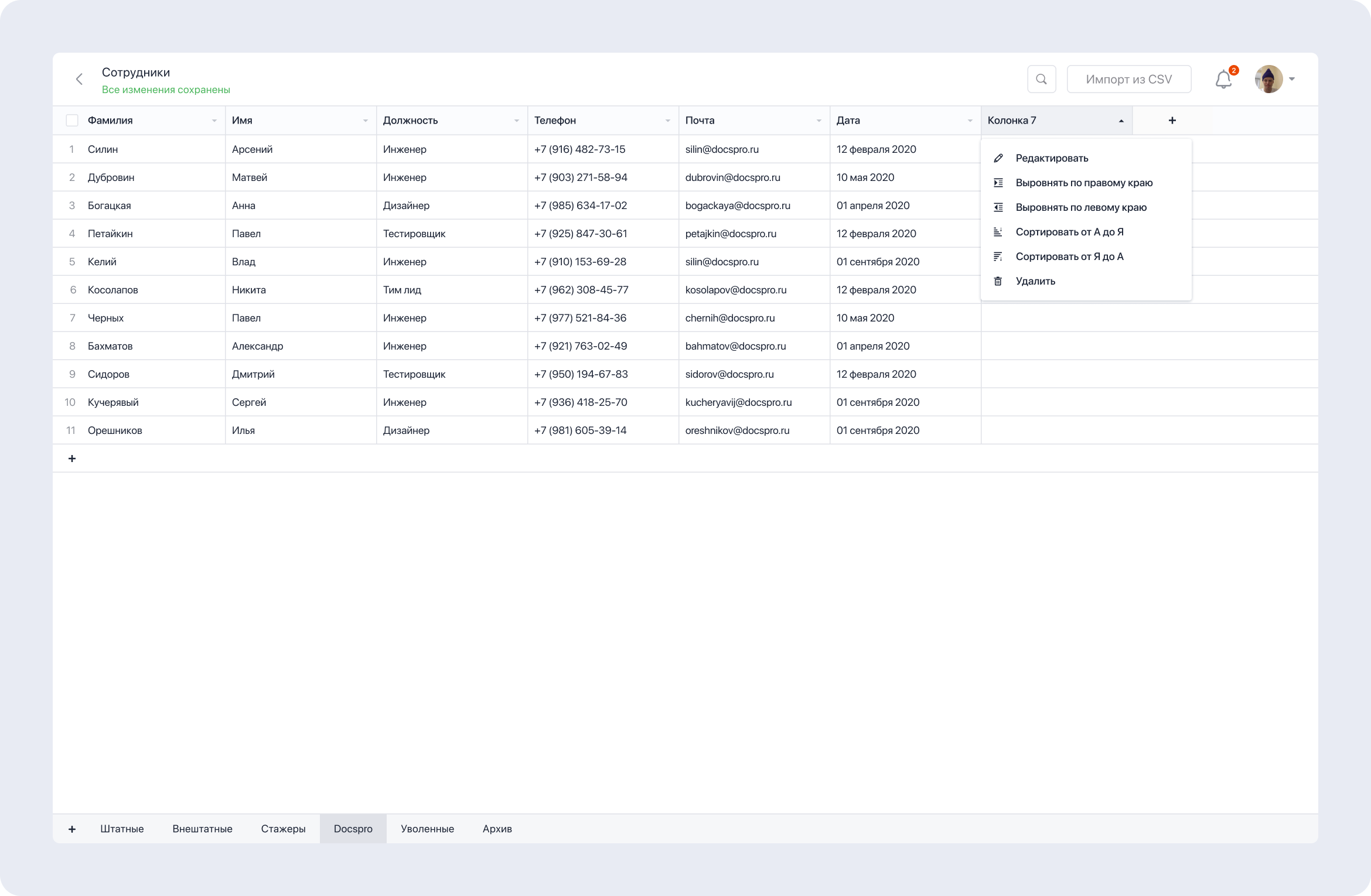
The employee directory: a table editor with configurable columns, sorting, alignment, and CSV import. Every record is a data source for any template in the system.
Approvals
The process side was covered by approvals with comments and change history. Documents deviating from the template were automatically routed to the right specialists for approval; standard ones passed through without delays.
Comments live right inside the document text: discussion of a selected fragment, suggested wording replacements, resolution statuses. Approval stopped being an email thread and became part of the document itself.
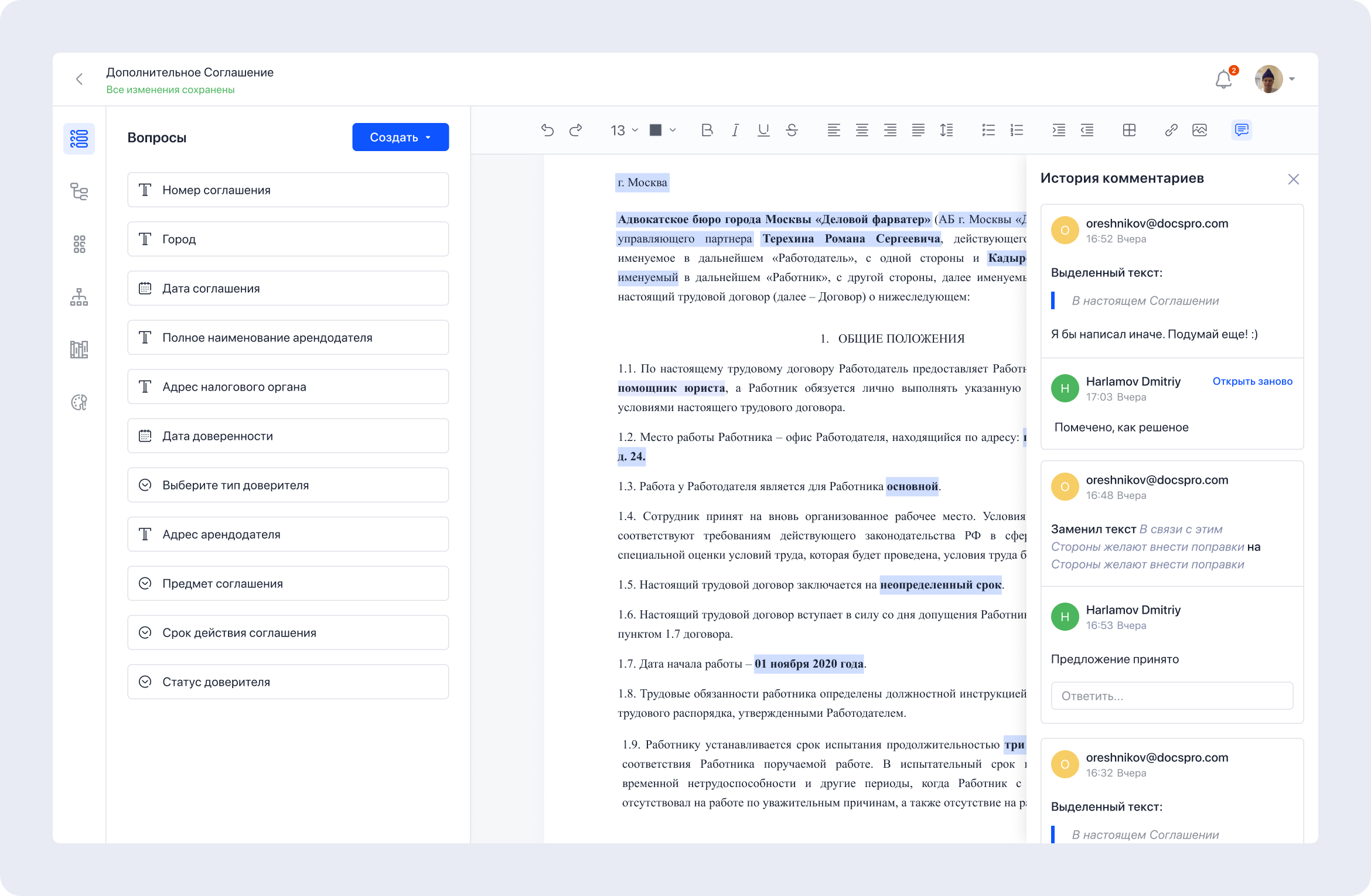
Comment history inside a document.
Role model and admin panel
Access was solved with a granular permission system. I designed a two-level role model: access to product sections — Settings, Documents, Templates, Directories — and access to individual actions within a section: can edit templates, can share, can duplicate, can connect directories.
This closed the structural problem from the beginning of this case: an executive sees the deal amount and financial data; a regular employee sees only the document text, with sensitive fields hidden. Data is protected from leaks at the level of the access architecture itself.
Behind the role model stood a large administrative part of the product: workspaces, members and groups, security, billing, integrations. I designed all of it, but this case shows only a fragment — the admin panel deserves a story of its own.
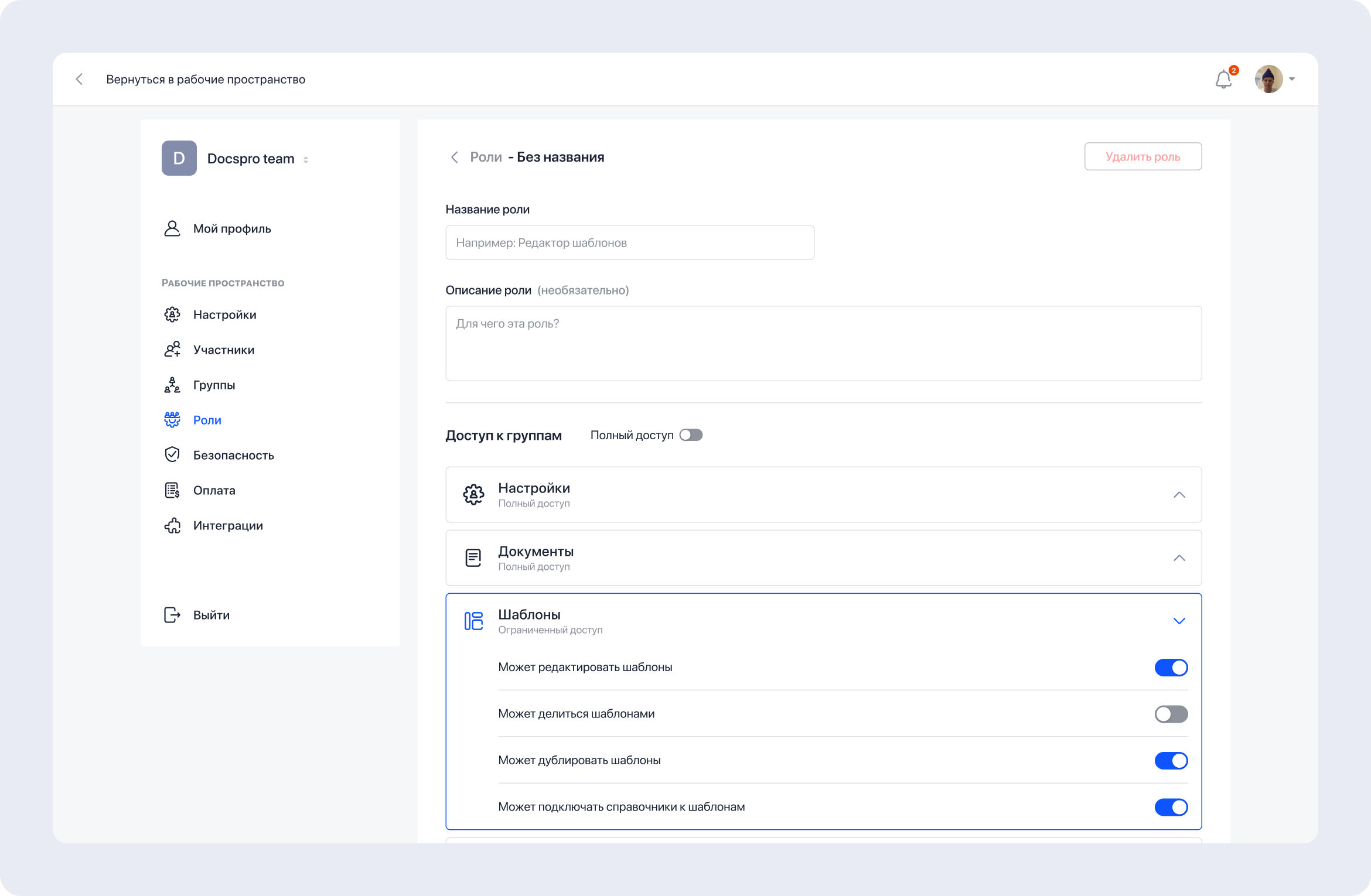
The role builder in the admin panel.
Outcome
from 7 days to 1 day
average approval time reduced
down to 0%
errors in critical contract clauses
Docspro was the first project where I was responsible for the product as a whole, not just the mockups. The main lesson was about confidence: being right isn't enough — decisions have to be pushed through with evidence. The Atlassian design system story taught me to show rather than persuade: an argument you can touch weighs more than an argument you can ignore.
And what I'm genuinely proud of is the linked templates mechanic. It wasn't born from reference-browsing but from deep immersion in someone else's pain: when you understand the user's problem so well that you see a solution no one has built yet.